Focus Inbox
24 October, 2026
Focus Inbox is a concept for keeping WhatsApp's Chats tab useful as more businesses message there. It groups promotional messages into one quiet place, while protecting the receipts, updates, and alerts people actually need to see.
The people, businesses, and messages in this concept are fictional. It is an independent design study and has no affiliation with WhatsApp or Meta.
The Inbox Is Carrying Too Much
Businesses now send delivery updates, payment receipts, offers, and sales messages in the same place as friends and family. When every brand gets its own row in Chats, real conversations become harder to find and the inbox starts to feel noisier than it needs to be.
The goal was not to make business messages disappear. It was to reduce repeated promotional interruptions while keeping the inbox a trustworthy place for information that is time-sensitive or tied to something a person has already done.
One Quiet Place For Promotions
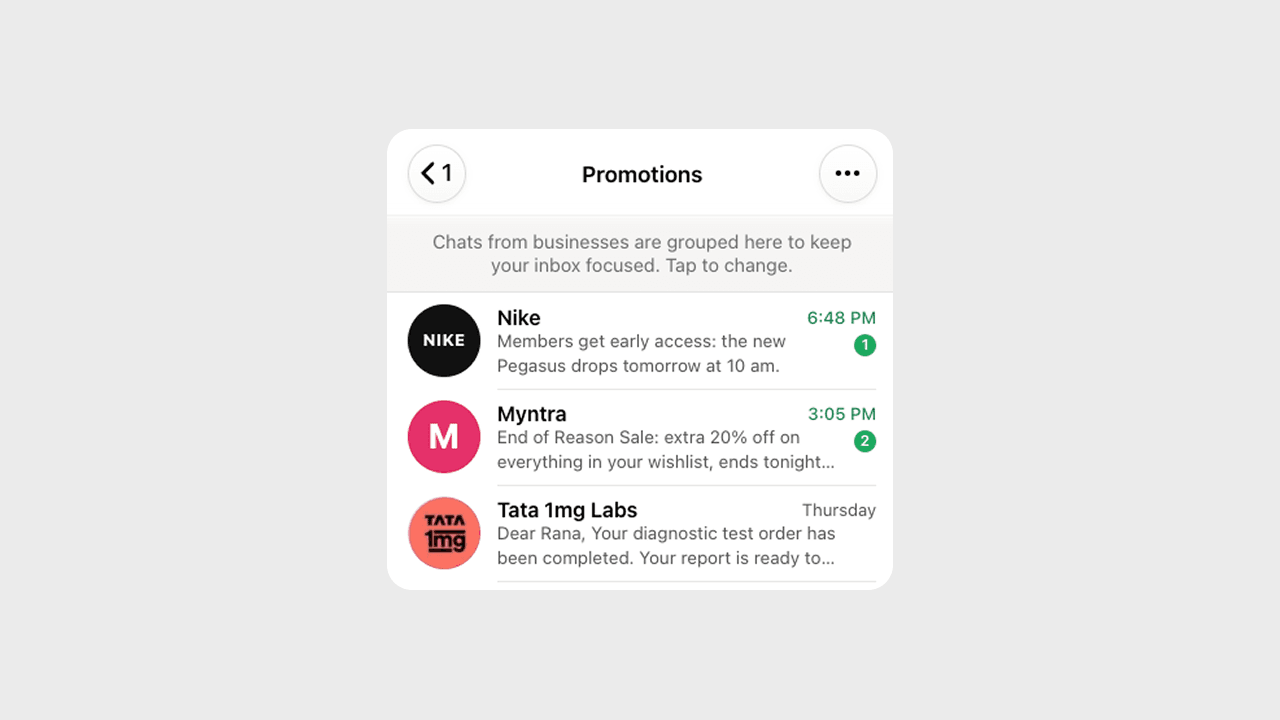
Instead of adding a new tab, Focus Inbox folds promotions into one strip directly below Archived. The strip names a few senders, shows an unread count, and opens a calm list of promotional chats only when someone chooses to look.
The count represents unread promotions, not the total number of chats. Promotions also stay out of the Chats tab badge, so offers do not make the app look busier than it is. The main inbox returns to being about people and conversations.
Intent Matters More Than The Sender
Not every message from a business is promotional. IndiGo sending a flight-delay alert is important, while IndiGo offering a discounted trip is marketing. The sender is identical; the intent of the message is not.
Smart Sort therefore asks whether a message responds to an action someone already took or encourages a new commercial action. Booking confirmations, flight updates, delivery status, payment receipts, OTPs, and appointment reminders stay in Chats. Discounts, product launches, coupons, and “Book now” campaigns can move to Promotions.
Prefer The Costlier Mistake
Classification will never be perfect, so Focus Inbox does not treat every prediction equally. A high-confidence promotion can go to Promotions. An uncertain, transactional, or time-sensitive message stays in Chats.
This favors access over tidiness. An ad in Chats is an inconvenience; a flight cancellation hidden in Promotions could have serious consequences. People can correct the system with “Not a promotion” or “Move to Promotions,” allowing Smart Sort to adapt to what they consider important.
Control Without Inbox Chaos
A long press opens a focused menu for one promotional chat: move it to the inbox, block it, or delete it. The growing fill under the row confirms that the hold is registering before the menu appears.
For cleanup at scale, Select chats exposes multi-select and Delete all. Actions remain inactive until a chat is chosen, and every move, block, or delete offers Undo. A chat moved back to the inbox returns to the right position based on its most recent message.
Visible Only When It Helps
The Promotions strip is not permanent interface chrome. It appearsonly when there are active promotions and disappears when there are none. That keeps the solution present when it is useful and absent when it would only add another thing to scan.
Designing For Trust
Focus Inbox is not about treating every business message as noise. A receipt, delivery update, or flight change can matter just as much as a message from a friend, while repeated offers should not be allowed to take over the same space.
That is why the system sorts by intent, favors access when it is uncertain, and gives people a way to correct it. Promotions become quieter without making important information harder to find.